When will this work order be done?Answer sales on the spot.
CommandRoom brings the weekly plan, daily scheduling, job reporting and progress tracking together, so you know where every work order stands and what the floor is set to run. No more asking around for a completion date — look at the plan and the schedule, and reply to sales quickly.
In daily use at a listed metal-processing manufacturer
Yesterday
Finished 180
Tomorrow
Scheduled 100
This week
Planned 500
Today
In progress 120
Day after next
Scheduled 100
This work order is due to finish the day after tomorrow
A production plan alone still cannot say when an order will be done
The plan only tells you the latest a job can start
A production plan can lay work orders out against their due dates, but it does not go on to assign machines, operators and times — so when a job will actually be finished is still anyone's guess.
Once the orders pile up, dispatching from experience loses the whole picture
Dozens of work orders are waiting, each competing for machines, people, moulds and process steps. Move one and everything else moves with it.
By the time the delay shows, overtime is the only way back
A slip usually surfaces as the due date closes in, by which point there is no longer enough room to rearrange anything.
Get the production plan to the floor, as a schedule that can actually be run each day
Build the plan against capacity load; generate a daily schedule that accounts for operators, machines, moulds and routing time constraints; then let digital job reporting roll the following days forward, with the change in progress plainly shown.
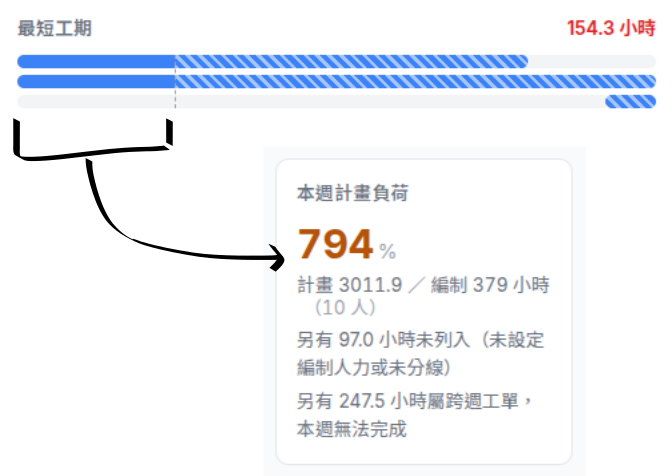
Adjust the production plan against each line's load
Rather than working backwards from the delivery date alone, CommandRoom estimates capacity load from lines, machines, people and the standard times held on each routing, so planners can weigh capacity in and build a plan the factory can hold to. Several production periods can be managed at once.
Generate a conflict-free daily schedule automatically
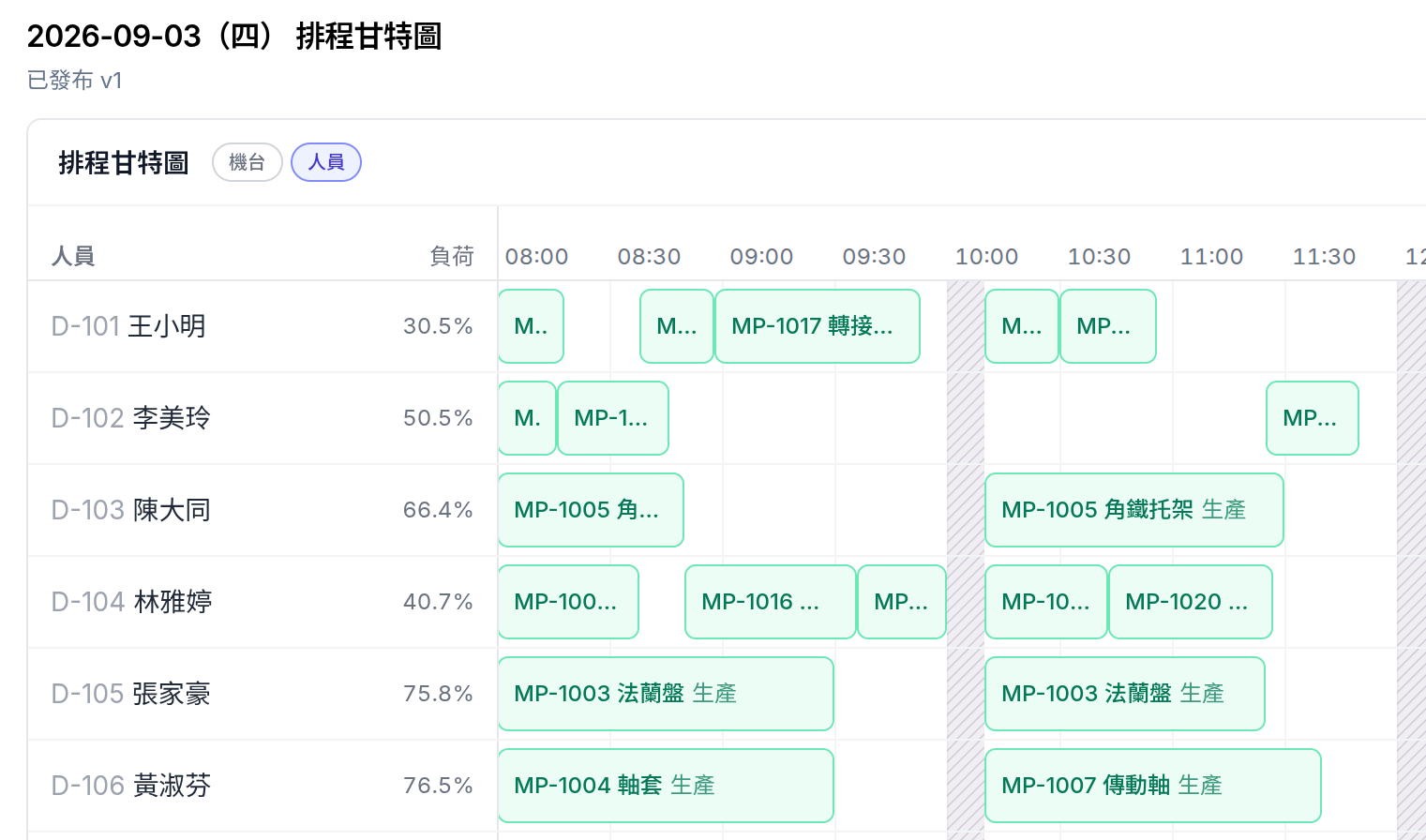
Dispatching from experience cannot hold the whole floor in view, and it cannot say what a full day will produce. Select the work orders whose materials are ready and staff each line; CommandRoom weighs operators, machines, moulds and routings together, keeps the schedule free of resources competing for the same slot, and produces a daily schedule the floor can actually run. Before the end of one day you know how far the next is expected to get — and the dispatching rules stop living only in a veteran's head.
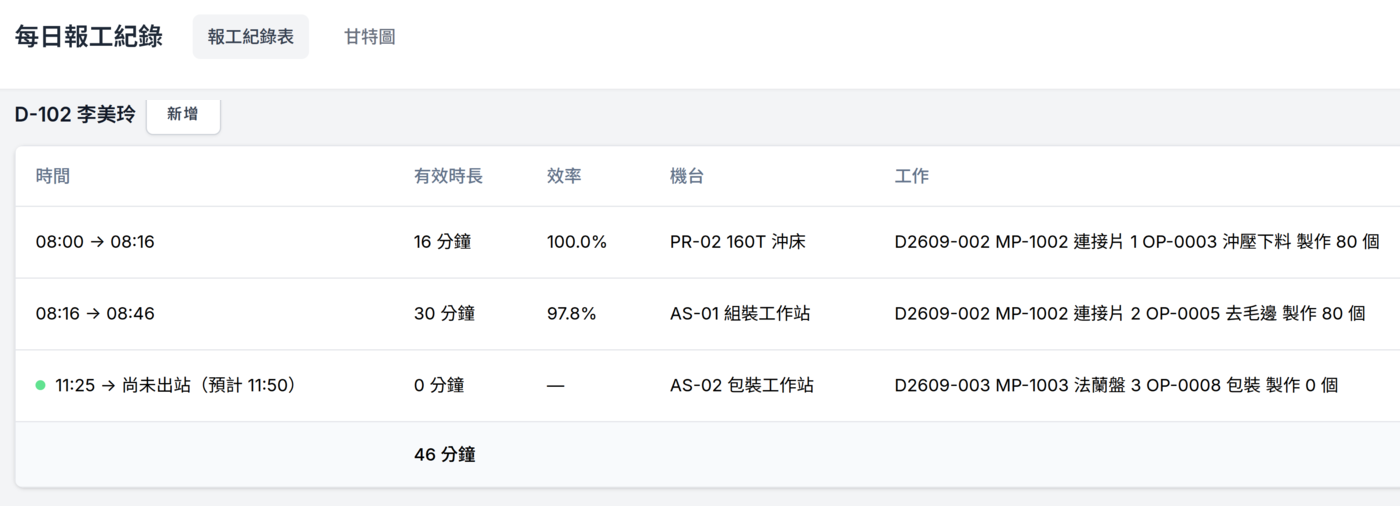
Record process times and quantities in full, from a desktop or a tablet
Pen and paper usually leave a quantity behind and little else, with no accurate record of how long the work took. Digital job reporting records process time alongside quantity, which is what makes efficiency calculable and what feeds the schedule as the day goes. Paired with machine integration, counts can come from the machines themselves.
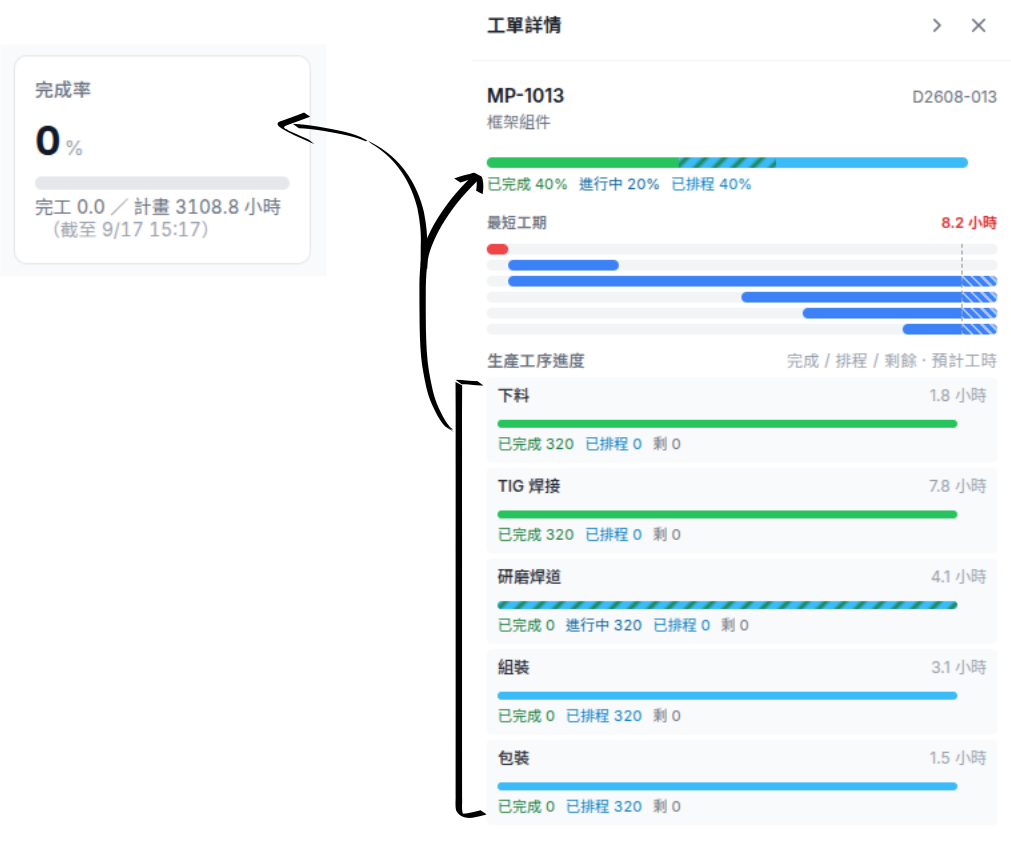
See how far the plan and each day's schedule have got
Beyond the finished, running and scheduled split on a single work order, CommandRoom shows how far a day's schedule and the production plan as a whole have got — so the state of an order is something you read rather than something you ask the floor for.
Don't let dispatching know-how retire with the people who hold it
If the person who dispatches the work takes leave, moves on or retires, do the lines keep running?
Dispatching logic is built up over years, lives in a few people's heads, and cannot be explained in a sentence or handed over in any orderly way. CommandRoom puts the scheduling constraints, the resources and the line rosters into the system and keeps a record of what was scheduled, so scheduling rests on rules and data anyone can follow rather than on one person's experience.
Is CommandRoom a fit for your factory?
Tick whatever matches your floor today, and see whether CommandRoom is a fit.
CommandRoom looks worth exploring
From what you have ticked, how you run production today overlaps a good deal with what CommandRoom was built to solve. Tell us how you schedule at the moment and we can work out together whether it fits.
CommandRoom may be a fit
From what you have ticked, there is some overlap between CommandRoom and how you run production today. Whether it actually fits depends on your scheduling process and what the floor needs. Talk to us and we can look at whether it solves the problems you have.
CommandRoom may not be the most direct answer for you right now
From what you have ticked, what you need does not line up closely with what CommandRoom is mainly used for. If you are working on production scheduling or shop-floor management more broadly, we are still glad to hear what you are trying to do.
Let's talk about scheduling your floor
Got it — thank you.
We will be in touch shortly. If you have a moment before then, think about the one scheduling problem you would most like solved; it makes the first conversation go further.
Frequently Asked Questions
Can it integrate with our ERP? Where do the work orders come from?
Yes. Rather than have somebody export from the ERP and import into CommandRoom by hand — which is work we would be adding, not removing — we would rather integrate with the data you already have flowing. No IT department is needed: we work out with you whether that is an API, a database connection, or something else.
Can this go through a government grant programme?
Yes. Get in touch and we will work out together which programme fits.
Want to know more about CommandRoom?
Tell us how you plan and schedule production today, and see whether CommandRoom is a fit for you.